
🚫 Why Website Speed Matters
- Users leave if a page takes more than 2–3 seconds
- Slow sites rank lower on search engines
- Poor speed = low conversions
👉 Fast design = better experience + more sales
⚡ Top Design Issues Slowing Your Website
🖼️ 1. Heavy Images (Biggest Problem)
Large, unoptimized images can slow your site badly.
❌ High-resolution images without compression
✅ Compressed, optimized images
✔ Fix:
- Use WebP or compressed formats
- Resize images before uploading
- Use lazy loading
🎨 2. Too Many Design Elements
Overloaded design = slow performance.
👉 Problem:
- Too many animations
- Excess graphics
- Complex layouts
✔ Fix:
- Keep design clean and minimal
- Remove unnecessary elements
- Focus on simplicity
🎥 3. Auto-Play Videos & Background Media
Videos can make your site look modern—but they slow it down.
✔ Fix:
- Avoid auto-play videos
- Use thumbnails instead
- Optimize video size
📦 4. Unoptimized Fonts & Icons
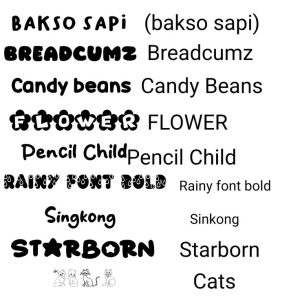
Too many font styles and icon libraries increase load time.
✔ Fix:
- Use 1–2 font families only
- Limit font weights
- Use lightweight icon sets
📱 5. Not Mobile Optimized
Mobile users face slow loading if design isn’t responsive.
✔ Fix:
- Use mobile-first design
- Optimize images for mobile
- Test on different devices
🔌 6. Too Many Plugins & Widgets

Extra features = extra load time.
✔ Fix:
- Remove unused plugins
- Keep only essential tools
- Avoid heavy third-party scripts
💻 7. Poor Code Structure
Messy code slows everything.
✔ Fix:
- Minify CSS, HTML, JavaScript
- Remove unused code
- Use clean coding practices
🌐 8. No Caching & CDN
Without caching, your site reloads everything every time.
✔ Fix:
- Enable browser caching
- Use a CDN (Content Delivery Network)
- Store static files efficiently
🏆 Quick Speed Optimization Checklist
✔ Compress images
✔ Use minimal design
✔ Avoid heavy videos
✔ Limit fonts & plugins
✔ Optimize for mobile
✔ Clean and minify code
✔ Enable caching & CDN
❓ FAQ (Frequently Asked Questions)
1. How can I check my website speed?
You can use tools like Google PageSpeed Insights or GTmetrix.
2. What is the ideal website loading time?
2–3 seconds or less is considered good.
3. Do images really affect website speed?
Yes, large images are one of the biggest causes of slow websites.
4. Can design alone slow down a website?
Yes, heavy design elements and poor structure can significantly affect speed.
5. Is fast hosting enough to fix speed issues?
No, design optimization is equally important.
📌 Conclusion
If your website is slow, don’t just blame hosting—fix your design first.
👉 Focus on speed, simplicity, and optimization, and your website will perform better across all metrics.