How to Become a Content Creator with No Experience

Introduction

Content creation has become one of the most powerful ways to build a personal brand, grow an audience, and earn money online. The best part? You don’t need experience, expensive gear, or a large following to get started.

If you’re wondering how to become a content creator from scratch, this guide will walk you through everything you need—from choosing a niche to making your first income.


What Is a Content Creator?

A content creator is someone who produces and shares content online to inform, entertain, or inspire an audience.

Types of Content:

  • Videos (YouTube, Instagram Reels, TikTok)
  • Blog posts
  • Social media content
  • Podcasts
  • Graphics and infographics

Step 1: Choose Your Niche

Your niche is the topic you’ll focus on.

How to Choose:

  • Pick something you enjoy
  • Choose a topic you can talk about consistently
  • Ensure there’s audience demand

Popular Niches:

  • Fitness
  • Finance
  • Tech
  • Education
  • Lifestyle

Tip: You don’t need to be an expert—just start and learn as you go.


Step 2: Understand Your Audience

Before creating content, know who you’re creating for.

Ask:

  • What problems do they have?
  • What type of content do they like?
  • What solutions can you offer?

Step 3: Choose Your Platform

Start with one platform to stay focused.

Best Options:

  • YouTube (long-form video)
  • Instagram (short-form + branding)
  • TikTok (viral content)
  • Blogging (SEO-based growth)

Choose based on your strengths:

  • Writing → Blogging
  • Speaking → Video

Step 4: Create a Content Plan


Consistency requires planning.

Simple Weekly Plan:


  • 2 educational posts
  • 1 entertaining post
  • 1 personal post

Content Ideas:

  • Beginner tips
  • Common mistakes
  • Step-by-step tutorials

Step 5: Start Creating (No Experience Needed)

Don’t wait for perfect conditions.

What You Need:

  • Smartphone
  • Internet
  • Free tools

Beginner Tips:

  • Use natural lighting
  • Keep videos simple
  • Focus on clarity over perfection

Step 6: Learn Basic Skills

To improve your content, learn:

  • Hook writing (grab attention fast)
  • Storytelling
  • Basic editing
  • Clear communication

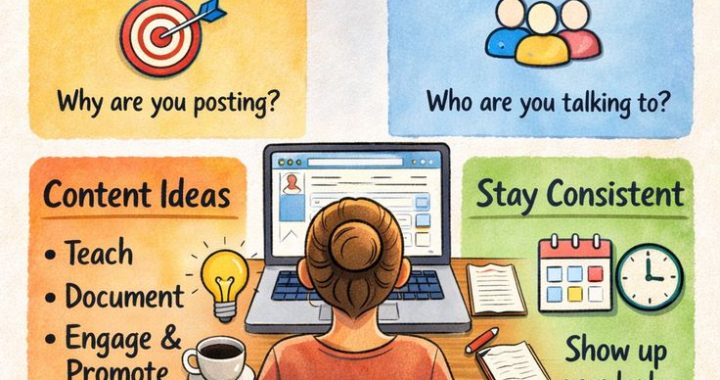
Step 7: Stay Consistent

Consistency is key to growth.

Posting Schedule:

  • 3–5 times per week
  • Stick to a routine

Growth takes time—don’t quit early.


Step 8: Focus on Value

Don’t chase views—focus on helping people.

Create content that:

  • Solves problems
  • Teaches something useful
  • Entertains

Step 9: Use SEO & Hashtags

Help people discover your content.

Tips:

  • Use keywords in titles
  • Add relevant hashtags
  • Write engaging captions

Step 10: Engage with Your Audience

Build a connection with your audience.

  • Reply to comments
  • Ask questions
  • Encourage interaction

Step 11: Analyze and Improve

Track your performance.

Monitor:

  • Engagement
  • Views
  • Audience feedback

Improve based on what works.


Step 12: Monetize Your Content

Once you grow, you can earn money.

Ways to Earn:

  • Brand deals
  • Affiliate marketing
  • Selling products
  • Freelancing
  • Ad revenue

Common Mistakes to Avoid

  • Waiting for perfect setup
  • Inconsistent posting
  • Copying others
  • Ignoring audience needs
  • Giving up too early

Final Thoughts

Becoming a content creator with no experience is completely possible. Everyone starts from zero—the key is to start now, stay consistent, and keep improving.

Your first content won’t be perfect—but it will be the start of your journey.


FAQs

1. Can I become a content creator with no experience?

Yes, anyone can start with basic tools and learn over time.

2. How long does it take to grow?

It usually takes 3–6 months to see initial growth with consistency.

3. Do I need expensive equipment?

No, a smartphone is enough to start.


Conclusion

Start today. Don’t wait for the perfect time or perfect skills. The more you create, the better you’ll become


Free Email Marketing Software for Beginners

Email marketing is one of the easiest and most cost-effective ways to grow your business. But if you’re just starting out, you might not want to spend money right away.

The good news? There are several free email marketing tools that offer powerful features to help you get started.

In this guide, we’ll explore the best free email marketing software for beginners, their features, and how to choose the right one.


📌 Why Use Free Email Marketing Software?

Free tools are perfect for beginners because they:

  • Require zero investment
  • Are easy to use
  • Offer basic automation features
  • Help you learn email marketing

👉 Ideal for bloggers, freelancers, startups, and small businesses.


🏆 Best Free Email Marketing Software (2026)

1. Mailchimp

Mailchimp is one of the most popular email marketing platforms worldwide.

Key Features:

  • Free plan for beginners
  • Drag-and-drop email builder
  • Basic automation
  • Pre-designed templates

Best For: Beginners who want an easy start


2. Brevo (formerly Sendinblue)

Brevo is a powerful tool with advanced features even in its free plan.

Key Features:

  • Unlimited contacts
  • Email automation
  • SMS marketing support
  • Advanced analytics

Best For: Small businesses and growing brands


3. ConvertKit

ConvertKit is designed mainly for creators and bloggers.

Key Features:

  • Easy email sequences
  • Landing page builder
  • Subscriber tagging
  • Automation workflows

Best For: Bloggers, YouTubers, and content creators


4. MailerLite

MailerLite is known for its simplicity and clean interface.

Key Features:

  • Drag-and-drop editor
  • Email automation
  • Landing pages
  • Pop-up forms

Best For: Beginners who want a simple tool


5. Benchmark Email

Benchmark Email offers a user-friendly platform with modern templates.

Key Features:

  • Responsive email templates
  • Marketing automation
  • Signup forms
  • Reporting tools

Best For: Small businesses and startups


⚖️ How to Choose the Right Software

When selecting a free email marketing tool, consider:

✔ Ease of Use

Choose a beginner-friendly interface.

✔ Free Plan Limits

Check:

  • Number of subscribers
  • Monthly email sending limits

✔ Features

Look for:

  • Automation
  • Templates
  • Analytics

✔ Scalability

Make sure you can upgrade later as your business grows.


🚀 How to Get Started (Quick Steps)

  1. Choose a platform (e.g., Mailchimp or Brevo)
  2. Create a free account
  3. Build your email list
  4. Design your first email
  5. Send your campaign

⚠️ Limitations of Free Plans

While free tools are great, they come with some limits:

  • Limited email sends
  • Branding in emails
  • Fewer automation features

👉 Upgrade when your business grows.


💡 Pro Tips for Beginners

  • Start with a small email list
  • Focus on quality content
  • Avoid spamming
  • Test different subject lines

📈 Final Thoughts

Free email marketing software is the perfect way to start your journey without spending money. Tools like Mailchimp, Brevo, and ConvertKit provide everything you need to build, send, and optimize email campaigns.

👉 Start free, learn fast, and upgrade when you’re ready.


FAQs

Q1. Which free email marketing tool is best?
Mailchimp and Brevo are great for beginners.

Q2. Can I send unlimited emails for free?
Most tools have limits on free plans.

Q3. Is email marketing still effective in 2026?
Yes, it remains one of the highest ROI marketing channels.


🎯 Conclusion

Starting with free email marketing software is a smart move. Choose the right tool, build your list, and begin growing your audience today.

How to Start Email Marketing Step-by-Step

Email marketing is still one of the most powerful ways to grow your business, connect with your audience, and increase sales. Whether you’re a beginner or a small business owner, this step-by-step guide will help you start email marketing from scratch.


📌 What is Email Marketing?

Email marketing is the process of sending emails to a group of people to promote products, share content, or build relationships with your audience.

It’s widely used because:

  • It’s cost-effective
  • Gives high ROI
  • Builds direct communication with customers

🚀 Step 1: Define Your Goal

Before you start, be clear about your objective.

Ask yourself:

  • Do you want to increase sales?
  • Build an audience?
  • Promote content?

👉 Example goals:

  • Grow email subscribers
  • Increase website traffic
  • Boost product sales

🧰 Step 2: Choose an Email Marketing Platform

You need a tool to send emails and manage subscribers.

Popular platforms include:

  • Mailchimp
  • ConvertKit
  • Brevo (Sendinblue)

👉 Look for features like:

  • Easy templates
  • Automation
  • Analytics

📋 Step 3: Build Your Email List

Never buy email lists ❌
Instead, build your own list organically.

Ways to grow your list:

  • Add signup forms on your website
  • Offer a free ebook or guide
  • Use popups or landing pages

👉 Example lead magnets:

  • Free checklist
  • Discount coupon
  • Free course

✍️ Step 4: Create Valuable Content


People only open emails that provide value.

Types of email content:

  • Educational tips
  • Promotions and offers
  • Newsletters
  • Product updates

👉 Focus on solving problems, not just selling.


🎨 Step 5: Design Your Email

Keep your email simple and clean.

Best practices:

  • Use a clear subject line
  • Keep paragraphs short
  • Add a strong call-to-action (CTA)

👉 Example CTA:

  • “Shop Now”
  • “Read More”
  • “Download Free Guide”

Step 6: Schedule and Send Emails

Consistency is key.

Tips:

  • Send emails weekly or bi-weekly
  • Test different sending times
  • Avoid spamming

📊 Step 7: Track Your Results

Measure your performance to improve.

Important metrics:

  • Open rate
  • Click-through rate (CTR)
  • Conversion rate

👉 Use analytics from your email platform.


🔄 Step 8: Optimize and Improve

Always test and improve your campaigns.

Try:

  • A/B testing subject lines
  • Different email designs
  • Personalized emails

⚠️ Common Mistakes to Avoid

  • Sending too many emails
  • Ignoring mobile users
  • Writing boring subject lines
  • Not tracking results

💡 Pro Tips for Success

  • Personalize emails using names
  • Use storytelling
  • Keep emails short and engaging
  • Segment your audience

📈 Final Thoughts

Starting email marketing may seem difficult, but by following these simple steps, you can build a strong email strategy that drives real results.

Remember:
👉 Start small
👉 Stay consistent
👉 Focus on value


FAQs

Q1. Is email marketing free?
Yes, many tools offer free plans for beginners.

Q2. How often should I send emails?
1–2 times per week is ideal.

Q3. Can I start email marketing without a website?
Yes, you can use landing pages instead.


🎯 Conclusion

Email marketing is not dead—in fact, it’s more powerful than ever. Start today, build your list, and grow your business step by step.


Social Media Marketing for Local Businesses in India

📌 Introduction

In today’s digital-first world, having a strong social media presence is no longer optional for local businesses in India—it’s essential. Whether you run a small shop, café, salon, or service-based business, platforms like Instagram and Facebook can help you reach nearby customers and grow your brand.

The good news? You don’t need a big budget to get started.


💡 What is Social Media Marketing?

Social media marketing is the process of promoting your business, products, or services using platforms like Instagram, Facebook, and WhatsApp.

It helps you:

  • Connect with local customers
  • Build trust and brand awareness
  • Increase sales and foot traffic

🚀 Why Social Media is Important for Local Businesses in India

Here’s why social media marketing works so well for small businesses:

  • 📍 Target Local Audience (people near your location)
  • 💰 Low Cost Marketing compared to traditional ads
  • 📲 Direct Communication via messages and comments
  • Customer Reviews & Trust Building

🧭 Step-by-Step Strategy for Local Business Growth

1. Choose the Right Platform

Focus on platforms where your customers are active:

  • Instagram → Best for visuals (food, fashion, salon)
  • Facebook → Local communities & ads
  • WhatsApp → Direct customer communication
  • Google Maps → Visibility in local search

2. Optimize Your Profile

Make your profile look professional:

  • Business name & logo
  • Clear bio with keywords
  • Contact details (phone, address)
  • Google Maps location link

👉 Example: “Best Salon in Prayagraj | Book Now”


3. Create Engaging Local Content

Content should be relevant to your local audience.

Content ideas:

  • Behind-the-scenes videos
  • Customer testimonials
  • Offers & discounts
  • Local festivals posts
  • Before/after transformations

4. Use Local SEO & Hashtags

To reach nearby customers:

  • Use hashtags like:
    • #PrayagrajBusiness
    • #LocalShopIndia
    • #SupportLocalIndia
  • Add location tags in posts
  • Register your business on Google My Business

5. Run Targeted Ads

Platforms like Instagram and Facebook allow you to:

  • Target people in your city
  • Set low daily budgets (₹100–₹500)
  • Promote offers and events

6. Engage with Your Audience

Don’t just post—interact!

  • Reply to comments
  • Answer messages quickly
  • Ask questions in captions
  • Run polls and contests

📈 SEO Tips for Better Reach

  • Use keywords like “best bakery in [city]”
  • Add location in captions and bio
  • Post consistently (3–5 times/week)
  • Use trending audio (for reels)
  • Encourage customer reviews

⚠️ Common Mistakes to Avoid

  • ❌ Ignoring comments/messages
  • ❌ Posting low-quality images
  • ❌ Not using local hashtags
  • ❌ Inconsistent posting
  • ❌ Only selling, not engaging

💰 Real Benefits for Local Businesses

With the right strategy, you can:

  • Increase foot traffic
  • Get more calls and bookings
  • Build a loyal customer base
  • Compete with bigger brands

🔮 Trends in India (2026)

  • Short-form videos (Reels) dominate
  • Hyperlocal targeting is growing
  • Influencer collaborations with local creators
  • WhatsApp marketing is booming

Conclusion

Social media marketing is a game-changer for local businesses in India. With the right approach, even a small shop can attract hundreds of customers online.

Start simple, stay consistent, and focus on your local audience—success will follow.


FAQs

1. Which platform is best for local businesses?
Instagram and Facebook are the most effective.

2. How much should I spend on ads?
You can start with as little as ₹100 per day.

3. Is social media marketing free?
Yes, organic marketing is free, but ads can boost results.


Affiliate Marketing Through Social Media

📌 Introduction

In today’s digital world, social media is not just for entertainment—it’s a powerful income tool. Platforms like Instagram, YouTube, and TikTok have made it easier than ever to start affiliate marketing.

If you’ve ever wondered how creators earn money by recommending products, this guide will show you exactly how to do it—even as a beginner.


💡 What is Affiliate Marketing?

Affiliate marketing is a simple process where you promote products using a special link. When someone purchases through your link, you earn a commission.

👉 Example:
You post a product review → share your affiliate link → someone buys → you earn money.


🚀 Why Social Media is Perfect for Affiliate Marketing

Social media gives you direct access to a large audience. Here’s why it works:

  • 📱 Massive daily users
  • 🎥 Easy content creation (reels, shorts, posts)
  • 💬 Direct engagement with followers
  • 💸 Low to zero investment

Platforms like Facebook and LinkedIn are also great depending on your niche.


🧭 Step-by-Step Guide to Start

1. Choose a Profitable Niche

Pick a topic you are interested in and that people are searching for.

Popular niches:

  • Health & Fitness
  • Technology
  • Beauty & Skincare
  • Finance & Investing
  • Online Earning

👉 Tip: Focus on one niche to grow faster.


2. Select the Right Platform

Choose where your audience spends time:

  • Instagram → Lifestyle & reels
  • YouTube → Tutorials & reviews
  • TikTok → Viral content
  • Facebook → Groups & communities

3. Join Affiliate Programs

Start by signing up for trusted platforms:

  • Amazon Associates
  • ClickBank
  • ShareASale

These platforms provide unique links to track your earnings.


4. Create High-Quality Content

Content is the key to success. Focus on helping your audience.

Content ideas:

  • Product reviews
  • “How-to” tutorials
  • Comparison videos
  • Top recommendations

👉 Example: “Top 5 Budget Smartphones in 2026”


5. Add Your Affiliate Links Smartly

You can place your links in:

  • Bio section
  • Video descriptions
  • Stories

Use tools like Linktree to manage multiple links easily.


6. Build Trust & Engagement

Trust = Sales 💰

  • Be honest in reviews
  • Share real experiences
  • Reply to comments
  • Stay consistent

📈 SEO Tips to Rank Your Content

To get traffic from Google and social platforms:

  • Use keywords naturally in titles and captions
  • Add hashtags (#affiliatemarketing #earnonline)
  • Write engaging headlines
  • Optimize thumbnails (for YouTube)
  • Post consistently

⚠️ Common Mistakes to Avoid

  • ❌ Posting only promotional content
  • ❌ Ignoring audience needs
  • ❌ Choosing random products
  • ❌ Expecting instant results

💰 How Much Can You Earn?

Your income depends on effort and strategy:

  • Beginners: ₹5,000–₹20,000/month
  • Intermediate: ₹20,000–₹1,00,000/month
  • Advanced: ₹1L+ per month

🔮 Future Trends (2026)

  • AI-powered content creation
  • Growth of short-form videos
  • Rise of micro-influencers
  • More focus on personal branding

Conclusion

Affiliate marketing through social media is one of the best ways to earn online in 2026. You don’t need huge followers—just the right strategy, consistency, and trust.

Start today, stay consistent, and focus on helping your audience—the income will follow.


FAQs

1. Is affiliate marketing beginner-friendly?
Yes, it’s one of the easiest ways to start earning online.

2. Which platform is best?
Instagram and TikTok are great for beginners, while YouTube works best for long-term growth.

3. Do I need investment?
No, you can start for free using social media platforms.


ChatGPT vs Google Search: What It Means for SEO in 2026

🔍 What is ChatGPT?

ChatGPT is an AI-powered chatbot that gives direct answers to user questions in a conversational way.

Instead of showing links, it:

  • Provides instant answers

  • Explains topics step-by-step

  • Feels like chatting with a human


🌐 What is Google Search?

Google Search is a search engine that shows a list of websites based on your query.

It:

  • Ranks web pages using SEO

  • Shows ads, snippets, and links

  • Lets users explore multiple sources


⚔️ ChatGPT vs Google Search (Key Differences)

Feature ChatGPT Google Search
Results Type Direct answers List of links
Speed Instant response Requires clicking links
Personalization High Medium
Source Visibility Limited High
SEO Impact Indirect Direct

👉 Simple Meaning:
ChatGPT gives answers, Google gives options.


🤖 How ChatGPT is Changing SEO

1. Less Clicks, More Direct Answers

Users now get answers without visiting websites.

👉 This leads to:

  • Zero-click searches increasing

  • Less organic traffic for some blogs


2. Content Quality Matters More Than Ever

AI tools prioritize:

  • Helpful content

  • Clear explanations

  • Real value

👉 Thin or keyword-stuffed content will not survive.


3. Conversational Keywords are Growing

People now search like they talk:

  • “How can I start blogging in India?”

  • “Which phone is best under ₹20,000?”

👉 Use long-tail, question-based keywords.


4. Authority & Trust are Crucial

AI models prefer:

  • Trusted websites

  • Expert-written content

  • Accurate information

👉 Build E-E-A-T (Experience, Expertise, Authority, Trust).


🌐 How Google Search is Evolving with AI

Google is not falling behind. It is integrating AI into search.

Example:

  • AI-generated summaries

  • Featured snippets

  • Voice search results

👉 Google is becoming more like ChatGPT.


📈 What This Means for SEO in 2026

✅ 1. SEO is NOT Dead

SEO is evolving, not disappearing.

You still need:

  • Keywords

  • Backlinks

  • Optimization


✅ 2. Focus on User Intent

Don’t just target keywords.
👉 Answer the real question behind the search.


✅ 3. Create Helpful, Human Content

Write like you’re explaining to a friend.

✔ Simple language
✔ Clear structure
✔ Practical examples


✅ 4. Optimize for AI + Search Engines

Your content should work for both:

  • Humans

  • Search engines

  • AI tools


🛠️ Best SEO Strategy for Beginners

Follow this simple plan:

Step 1: Choose Long-Tail Keywords

Example:
“how to earn money online in India for beginners”


Step 2: Write Problem-Solving Content

Answer real questions clearly.


Step 3: Use Proper Structure

  • Headings (H1, H2, H3)

  • Bullet points

  • Short paragraphs


Step 4: Add FAQs

Helps rank in voice search and snippets.


Step 5: Update Content Regularly

Fresh content ranks better.


❌ Common Mistakes to Avoid

  • Copy-pasting AI content

  • Ignoring user intent

  • Writing only for Google, not humans

  • Not optimizing for mobile users


📊 Future of SEO (2026 & Beyond)

The future is a mix of:

  • AI-powered search

  • Human creativity

  • Smart optimization

👉 Bloggers who adapt will win.


📌 FAQs

Q1. Will ChatGPT replace Google Search?

No. Both serve different purposes. Google is still essential for discovering websites.


Q2. Can ChatGPT help in SEO?

Yes! It helps with:

  • Content ideas

  • Keyword research

  • Writing assistance


Q3. Should I still start a blog in 2026?

Yes. Blogging is still profitable if done correctly.


🎯 Conclusion

ChatGPT vs Google Search is not a battle—it’s a shift.

  • ChatGPT = Quick answers

  • Google = Deep exploration

👉 For SEO success in 2026:

  • Focus on helpful content

  • Understand user intent

  • Use AI smartly


🔥 SEO Optimization (Bonus)

Meta Title:
ChatGPT vs Google Search: SEO Impact in 2026 (Beginner Guide)

Meta Description:
Learn how ChatGPT vs Google Search is changing SEO in 2026. Beginner-friendly guide with tips to rank higher and grow your traffic.

Focus Keyword:
ChatGPT vs Google Search

Slug:
chatgpt-vs-google-search-seo-2026

How AI is Changing SEO in 2026

Search Engine Optimization (SEO) is no longer just about keywords and backlinks. In 2026, Artificial Intelligence (AI) is transforming how websites rank, how users search, and how content is created.

 If you’re a beginner, don’t worry—this guide explains everything in a simple and friendly way so you can understand how AI is changing SEO and how you can take advantage of it.

🚀 What is AI in SEO?

AI in SEO means using smart tools and algorithms that can:

* Understand user intent
* Analyze massive data quickly
* Generate and optimize content
* Predict trends

 Search engines like Google now use AI to deliver more accurate and personalized results.

🔍 1. Search is Becoming Smarter (User Intent Matters More)

Earlier, SEO was about matching exact keywords.

 Now, AI understands:

* What users really mean
* Context behind the search
* Natural language queries

 Example:

 Instead of searching:

“best phone 2026”

 People now search:

 “Which phone is best for gaming under ₹30,000?”

 👉 This means you should write content that answers real questions, not just target keywords.

🤖 2. AI-Generated Content is Growing Fast

AI tools can now help create:

* Blog posts
* Product descriptions
* Social media content

 But here’s the catch:

 👉 **Google prefers helpful, human-friendly content**, not spammy AI text.

 What You Should Do:

* Use AI for ideas and drafts
* Add your personal experience
* Make content unique and helpful

📊 3. Voice Search & Conversational SEO

With voice assistants, people search differently:

* “Hey Google, how do I start a blog in India?”
* “What is the best way to earn money online?”

 👉 Your content should:

* Use simple language
* Answer questions clearly
* Include FAQ sections

🧠 4. AI Helps in Better Keyword Research

Modern SEO tools use AI to:

* Find low-competition keywords
* Suggest content ideas
* Analyze competitors

Beginner Tip:

 Focus on **long-tail keywords** like:

* “how to start blogging in India step by step”
* “best SEO tools for beginners free”

 These are easier to rank.

📈 5. Personalized Search Results

AI shows different results to different users based on:

* Location
* Search history
* Preferences

 👉 This means:

* Local SEO is more important
* Content should target specific audiences

⚡ 6. Featured Snippets & Zero-Click Searches

AI often answers questions directly on Google.

 Example:

* Definitions
* How-to steps
* Quick answers

 👉 To rank here:

* Use bullet points
* Write clear answers
* Add headings (H2, H3)

🔗 7. Quality Content is More Important Than Ever

AI can detect:

* Low-quality content
* Keyword stuffing
* Duplicate articles

 👉 Focus on:

* Helpful information
* Easy readability
* Real value

🛠️ 8. Top AI SEO Tools in 2026

Here are some beginner-friendly tools:

* ChatGPT (content ideas & writing)
* Surfer SEO (optimization)
* SEMrush (keyword research)
* Ahrefs (backlinks)

 💡 Simple SEO Strategy for Beginners (2026)

 Follow these steps:

1. Choose a low-competition topic
2. Use long-tail keywords
3. Write helpful, human-friendly content
4. Add headings and structure
5. Optimize for mobile users
6. Update content regularly

 ❌ Common Mistakes to Avoid

* Copying AI-generated content directly
* Ignoring user intent
* Keyword stuffing
* Not updating old content

🎯 Final Thoughts

 AI is not replacing SEO—it’s making it smarter.

If you focus on:

* Helping users
* Writing clear content
* Using AI tools wisely

 👉 You can still rank and grow your website in 2026.

📌 FAQs

 Q1. Is AI bad for SEO?

 No. AI is helpful if used correctly. It improves efficiency and research.

 Q2. Can beginners use AI for SEO?

 Yes! AI tools make SEO easier for beginners.

 Q3. Will AI replace bloggers?

 No. Human creativity and experience are still important.

🔥 Conclusion

SEO in 2026 is all about **quality, intent, and smart use of AI**.

Start small, stay consistent, and focus on helping your audience—that’s the real secret to ranking on Google.